Case study 02 · Briefing and follow-up
Creator Message Deck
Paste a creator thread. Claude works out what's going on, shows its reading so you can check it, and drafts the next message from what was actually said. No template to pick.
The problem
Templates made every follow-up sound like the last one.
Most of a fulfillment specialist's writing is the same four messages: the brief, a revision request, a nudge on something late, and an update when something changes. I was rewriting them from scratch on the creator platform, or starting from a template and editing it.
Templates had a specific failure. A third nudge read exactly like the first, so creators learned to ignore them. And a template can't say "you told me Thursday" because it doesn't know what the creator said. The useful information was in the thread, not in the template.
What I built
- Copy the whole conversation out of the creator platform and paste it in. Optionally add the campaign and anything you need to get across, like a new deadline.
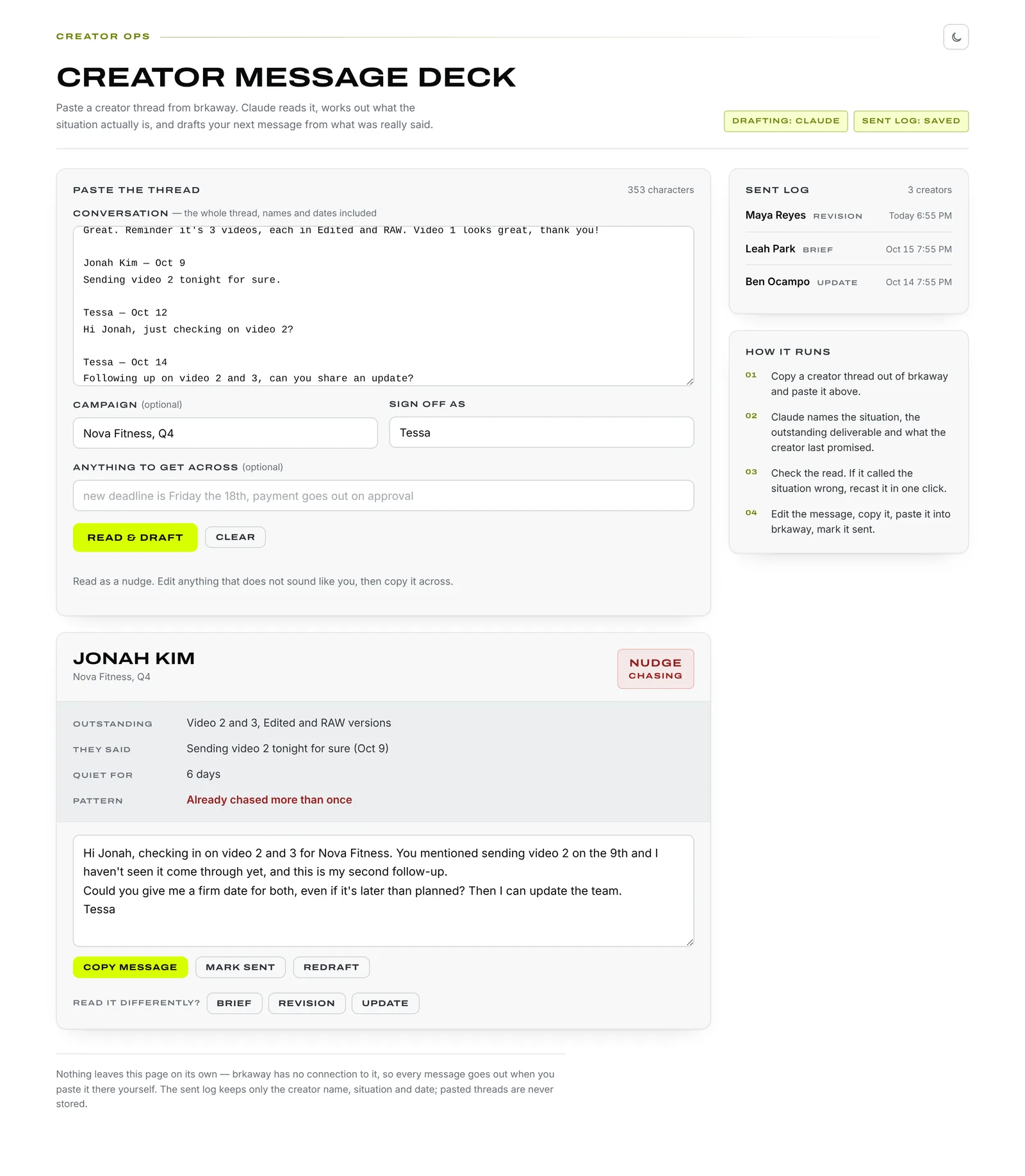
- Claude reads the thread and returns the situation (brief, revision, nudge or update), what's outstanding by name, the creator's last commitment in their own words, how many days they've been quiet, and whether they've already been chased more than once.
- Check the reading. If it called the situation wrong, recast it as any of the other three in one click.
- Edit the draft, copy it into the platform, and mark it sent. The sent log shows who has been contacted.
The real tool
Key decisions
Show the reading, not just the draft
The draft sits under a short summary of what Claude understood: the outstanding deliverables, the last promise, the days of silence. If the reading is wrong, the draft will be wrong too, and a wrong reading is far quicker to spot in five labelled lines than inside a finished message.
Escalate instead of repeating
When the thread shows the creator has already been followed up more than once without a real answer, the draft says so plainly and changes the ask to one concrete thing: a firm date, or a yes or no. This is the rule templates couldn't follow.
Name the actual deliverables
The prompt forbids "your deliverables" or "the content" when the thread names them. Messages say "video 2 and 3, Edited and RAW", which is what the creator needs to act on.
No invented facts
Claude may only use what's in the thread or what I typed into the "anything to get across" field. No made-up dates, rates or product claims. If a detail is missing, the draft writes around it.
Tone set by situation
Each of the four situations has its own tone rule. Revisions open with appreciation and frame notes as what the brand needs, never what the creator got wrong. Nudges assume good faith and give an easy out if timing shifted. Messages are short chat lines, not emails.
The human sends, and threads aren't stored
The tool has no connection to the creator platform, so nothing goes out unless I paste it. The sent log keeps only the creator's name, the situation and the date. Pasted conversations are never saved.
Outcome
- 4
- situations covered by one input: brief, revision, nudge and update
- 0
- templates to choose from; the situation is read from the thread
- 1
- click to recast a draft when the reading is wrong
Where it fits: Collab Digest tells me which creator needs a message today. Message Deck writes it.
What I learned
The first version asked me to pick the situation and filled in a template. Moving the judgment to the model only worked once the model showed its judgment back to me. A draft I can't check is a draft I have to reread line by line, which is the work I was trying to remove.