Case study 01 · Production tracking
Collab Digest
It started as one page that showed each person what needed them today. It's now a small internal web app: a daily digest, weekly KPIs, a view of every creator, message templates, bulk updates to Monday.com and a 7:30 AM Slack briefing. Used daily by the 4-person creative fulfillment department, and now being extended to the partnerships team.
The problem
Monday.com held everything, which meant nobody could see what needed them.
Every creative fulfillment specialist works the same production board, with hundreds of collaborations moving through planning, production, QC, post-production and client review. To find what needed them that morning, each person filtered the board, opened items one at a time, and scrolled through the update threads.
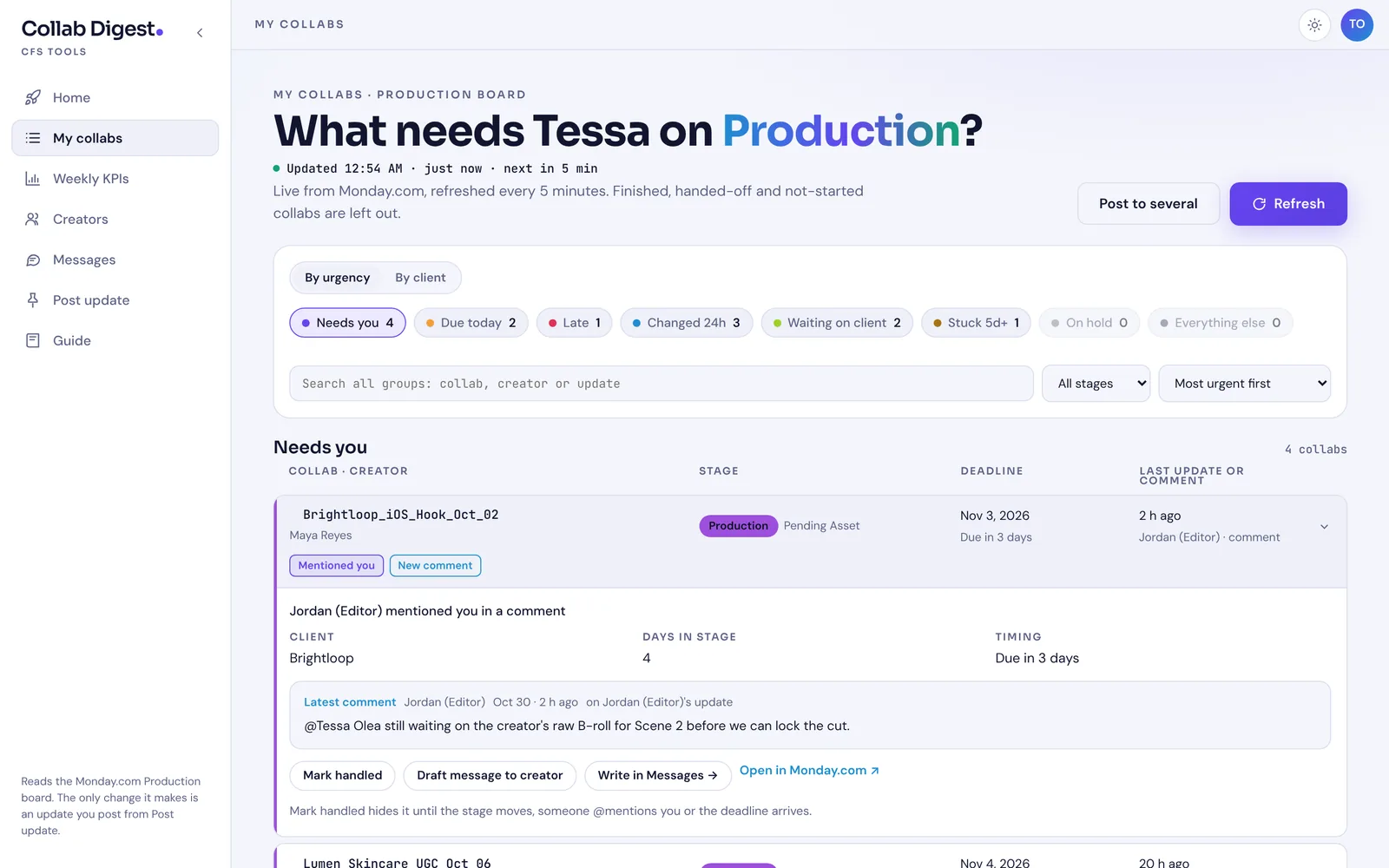
The threads were the slow part. The newest information was often a reply buried under an older post, so the top of the thread looked quiet when it wasn't. An @mention could sit unseen for a day. Late items and items that had sat in one stage for a week looked the same as everything else.
How it grew
Version 1 was a single page that ran inside claude.ai and read Monday.com through each person's own connection. It proved the idea, and the team used it every day.
Version 2 is its own web app on Vercel. Moving out gave it company sign-in, a schedule (so it can send a morning briefing with nobody at a browser), and room to grow from one page into the tools the team kept asking for:
- Home: today's Needs you, Due today and Late counts, and the next three collabs to look at.
- My collabs: the digest. Every active collab sorted into Needs you, Due today, Late, Changed 24h, Waiting on client, Stuck 5d+ or On hold.
- Weekly KPIs: delivered, on-time rate, cycle time and what's due this week, with 8-week charts, a 14-day deadline load, workload by stage and client, and a watchlist.
- Creators: everyone on your collabs, what they owe you, their on-time record and next deadline, with a Quiet flag after five days without a post.
- Messages: seven templates (late nudge, asset chase, revision request, deadline reminder, check-in, welcome, videos received) that fill in a creator's collabs and deadlines, plus a chase list with one late nudge per creator.
- Post update: tick several collabs, write one update with real @-tags, and it's posted on each one under your own Monday name.
- Morning briefing: a Slack DM at 7:30 AM Eastern on weekdays with your counts and top three collabs.
The real tool
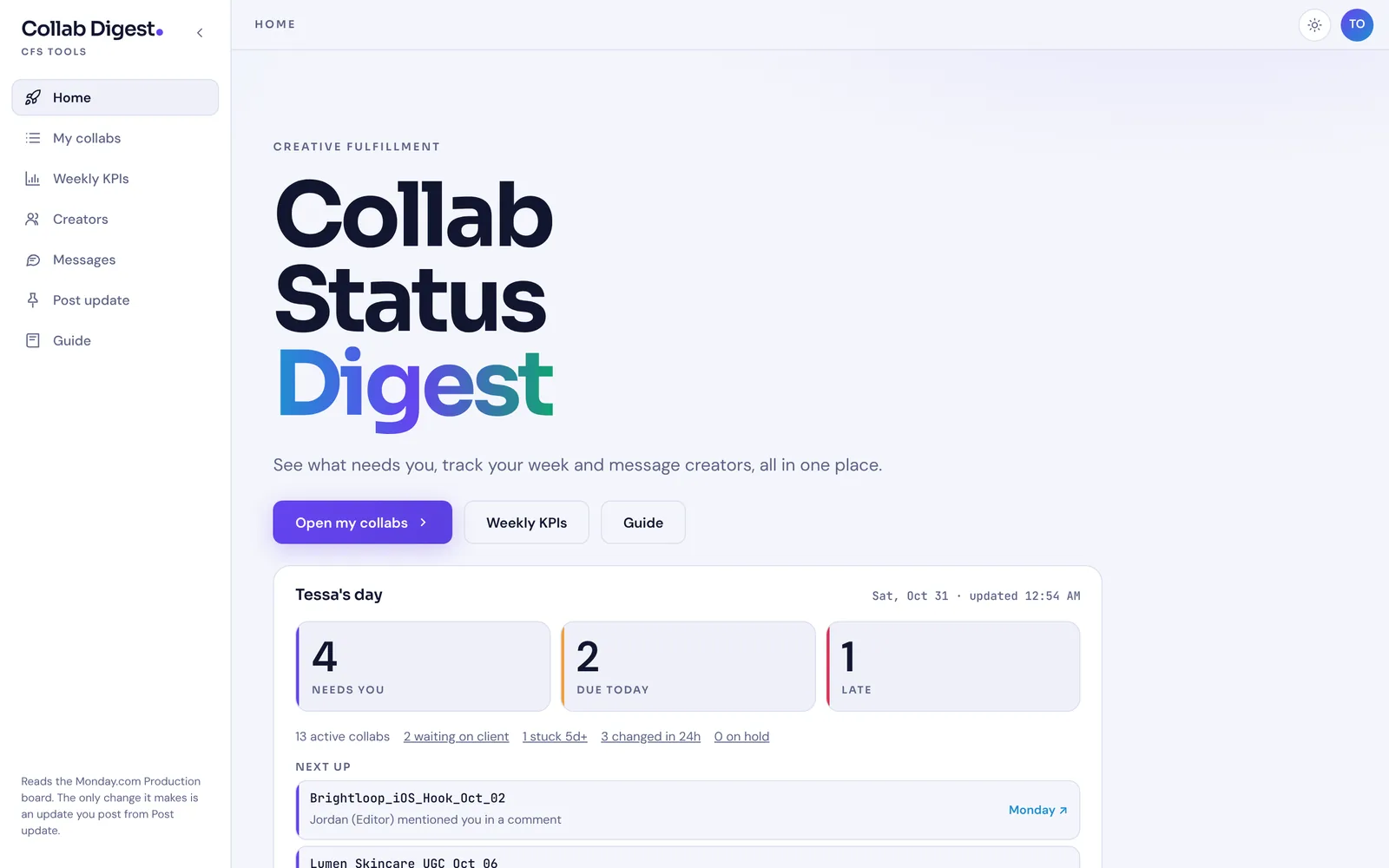
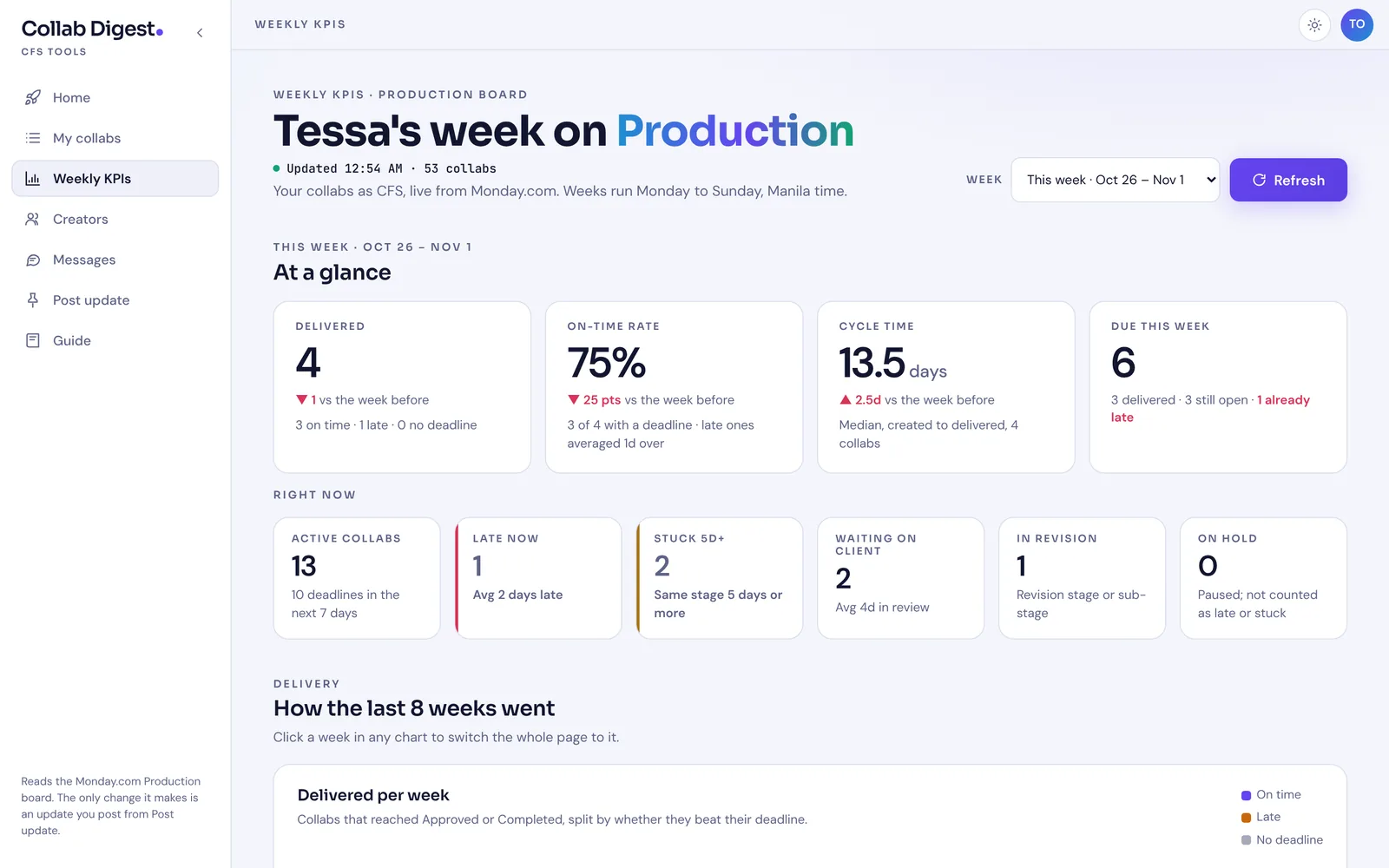
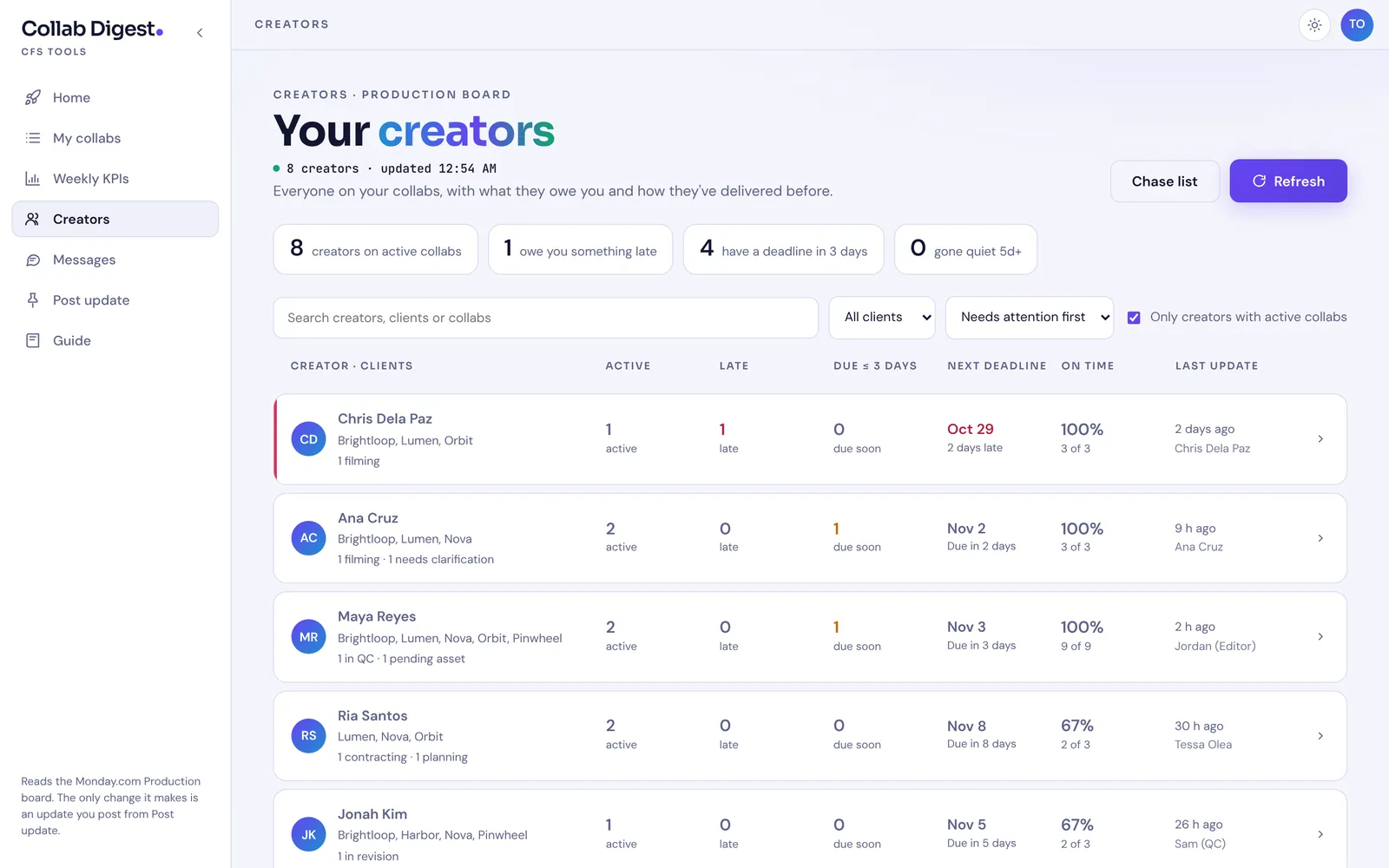
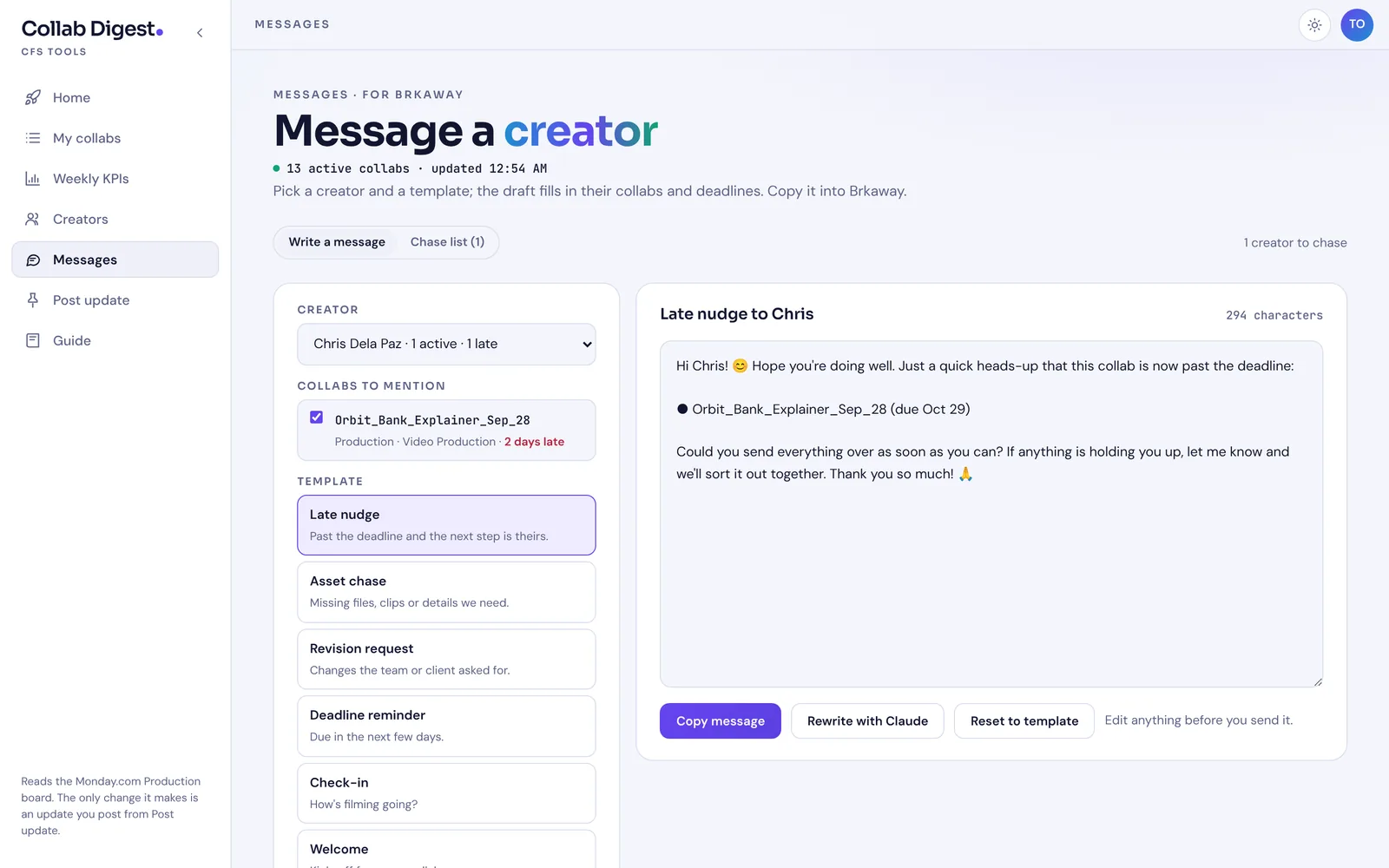
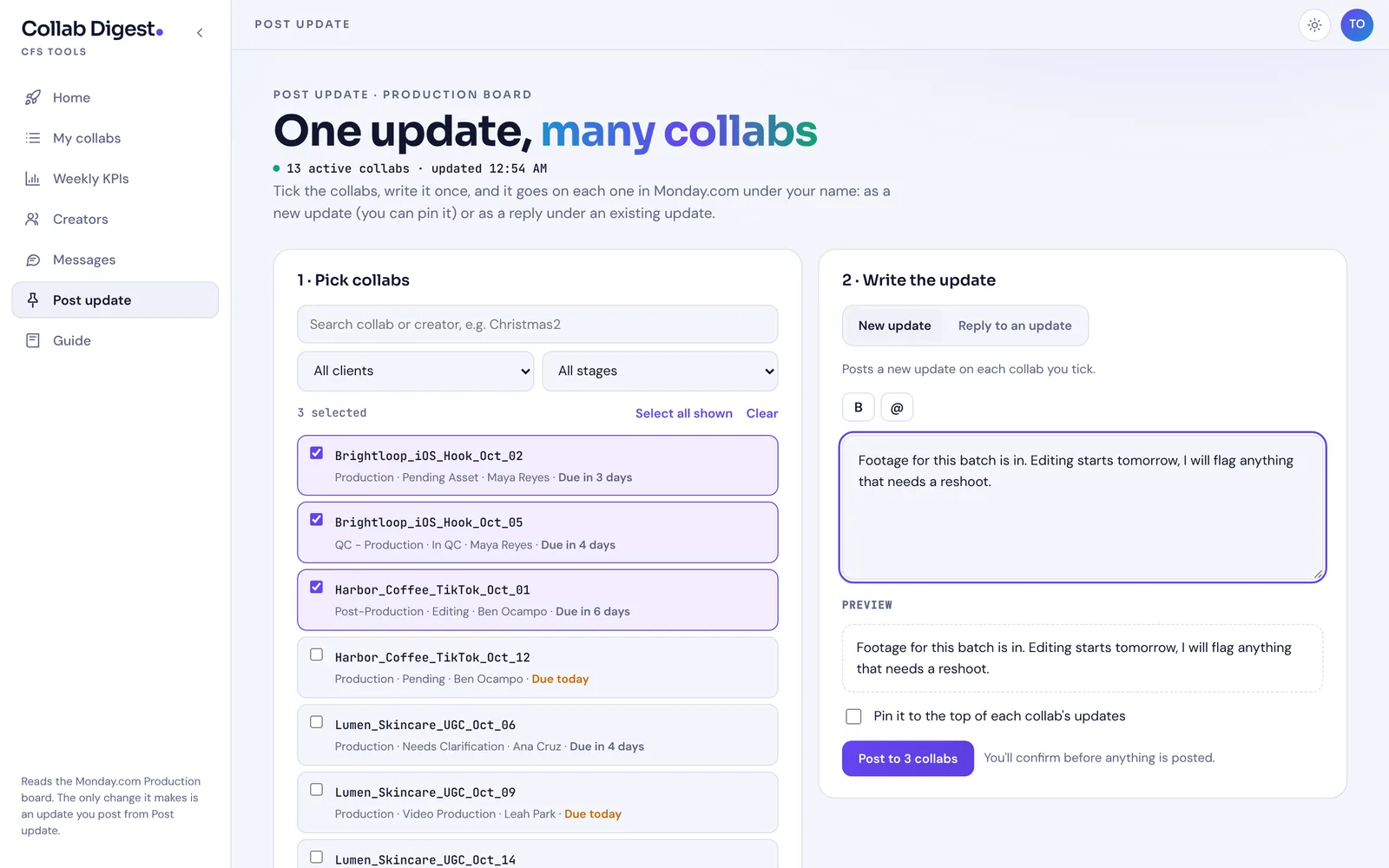
All screenshots come from the real app running with sample data, with the company name hidden.
Key decisions
Company sign-in, each person's own Monday access
People sign in with the company Google account, limited to the company domain. Each person then connects their own Monday.com token, so the app shows exactly what Monday already lets them see. The token is encrypted in a secure cookie, never reaches the page's JavaScript, and the server only sends a fixed set of queries.
Encode the team's rules, not just the board's
The board says what stage an item is in. It doesn't say whose move it is. Groups are checked in priority order and the first match wins. Due today and Late only count in the stages a specialist actually runs, a paused collab is never shown as late, and a "Pending Asset" in post-production belongs to the post-production manager, not the specialist.
One set of rules everywhere
The grouping logic lives in one shared file used by the digest, the Home snapshot and the Slack briefing, which runs the same browser code on the server. The three can never disagree about what's late.
Correct before cheap
The first version only re-read update threads for items whose
updated_athad changed. That turned out to miss new comments and @mentions, because Monday doesn't always change that field. Now every refresh re-reads every thread, in parallel batches, and speed comes from elsewhere.Fast without hammering Monday
Each page shows the last saved copy straight away, then swaps in the fresh read. The server keeps each person's list for 45 seconds so moving between pages is instant, and KPIs read only the last 180 days of finished work instead of the whole history.
One write, carefully guarded
Post update is the app's only change to Monday. It refuses any collab that isn't one of yours, asks you to confirm first, and lets failures be retried without posting twice. Tags are written as Monday's own mentions so each name appears once.
"Handled" that comes back when it should
Marking a collab handled hides it until the stage moves, someone @mentions you, or its deadline arrives. Team chatter and your own posts don't bring it back.
AI where it saves typing, with a person in charge
Drafts start from a template, and Claude can rewrite them using the latest update, with an instruction never to reveal internal names or QA notes. Nothing is sent to a creator automatically.
Outcome
- 4
- people in the department use it daily, each on their own Monday.com account
- 7
- pages, from the daily digest to KPIs, creators, messages and bulk updates
- 7:30
- AM Slack briefing every weekday, so the day starts before the tab is open
Next: extending it to the partnerships team. Their stages and "your move" rules differ, so the rollout means writing their rule set rather than copying ours.
What I learned
The hard part was never the API. It was writing down rules the team followed without thinking, such as whose move a sub-stage is, and when a handled item deserves to come back. Those rules now live in one place, readable and adjustable, instead of in four people's heads.
Moving from a single page to a real app meant owning the parts a platform used to handle: sign-in, secrets, schedules and caching. And one optimisation had to be undone. Skipping "unchanged" items was fast but missed comments, so I chose correct over cheap and made it fast another way.